
Day 1 Challenge - Terraform Deployment Identity
Day 1 Challenge - Terraform Deployment Identity
So far, most actions were performed with your own user account.
That is useful for learning, but in real environments Terraform is usually not executed by a personal account. It is usually executed by a dedicated deployment identity, for example:
service principal
workload identity
CI/CD pipeline identity
managed identity
In this challenge, you will configure Terraform to use a dedicated deployment identity.
The first attempt should fail. You will give Terraform enough access to deploy resources, but not enough access to create Azure RBAC role assignments.
Terraform may need permission to deploy resources and permission to assign access.
Those are related, but they are not the same thing.
Challenge goal
Configure Terraform so it can deploy the lab environment using a dedicated identity.
The goal is not only to make the deployment succeed.
The goal is to reason about:
Which identity is used?
Which permissions does it need?
Which permissions are too broad?
At which scope should permissions be assigned?
How can we avoid making the deployment identity more powerful than necessary?
You will first create a deployment identity with limited permissions. Terraform should fail when it tries to create RBAC role assignments.
After that, you will choose one of several fix options.
Mental model
Part 1 - Create a deployment identity
Create a service principal with Contributor on the lab resource group.
az ad sp create-for-rbac `
  --name "sp-cloudsec-terraform-<your-name>" `
  --role Contributor `
  --scopes /subscriptions/<SUBSCRIPTION_ID>/resourceGroups/<RESOURCE_GROUP_NAME>
The command returns values similar to this:
{
  "appId": "...",
  "password": "...",
  "tenant": "..."
}
You will need these values later when configuring Terraform authentication.
Warning
The password is a secret.
Do not commit it to Git, paste it into screenshots, or share it.
Part 2 - Configure Terraform authentication
Terraform can read Azure authentication values from environment variables.
Use the values returned by the service principal creation command.
PowerShell
$env:ARM_CLIENT_ID="<APP_ID>"
$env:ARM_CLIENT_SECRET="<PASSWORD>"
$env:ARM_TENANT_ID="<TENANT_ID>"
$env:ARM_SUBSCRIPTION_ID="<SUBSCRIPTION_ID>"
Bash
export ARM_CLIENT_ID="<APP_ID>"
export ARM_CLIENT_SECRET="<PASSWORD>"
export ARM_TENANT_ID="<TENANT_ID>"
export ARM_SUBSCRIPTION_ID="<SUBSCRIPTION_ID>"
Check that you are in the Terraform folder.
Then run:
terraform init
terraform plan
If the plan looks valid, run:
terraform applyPart 3 - Observe the failure
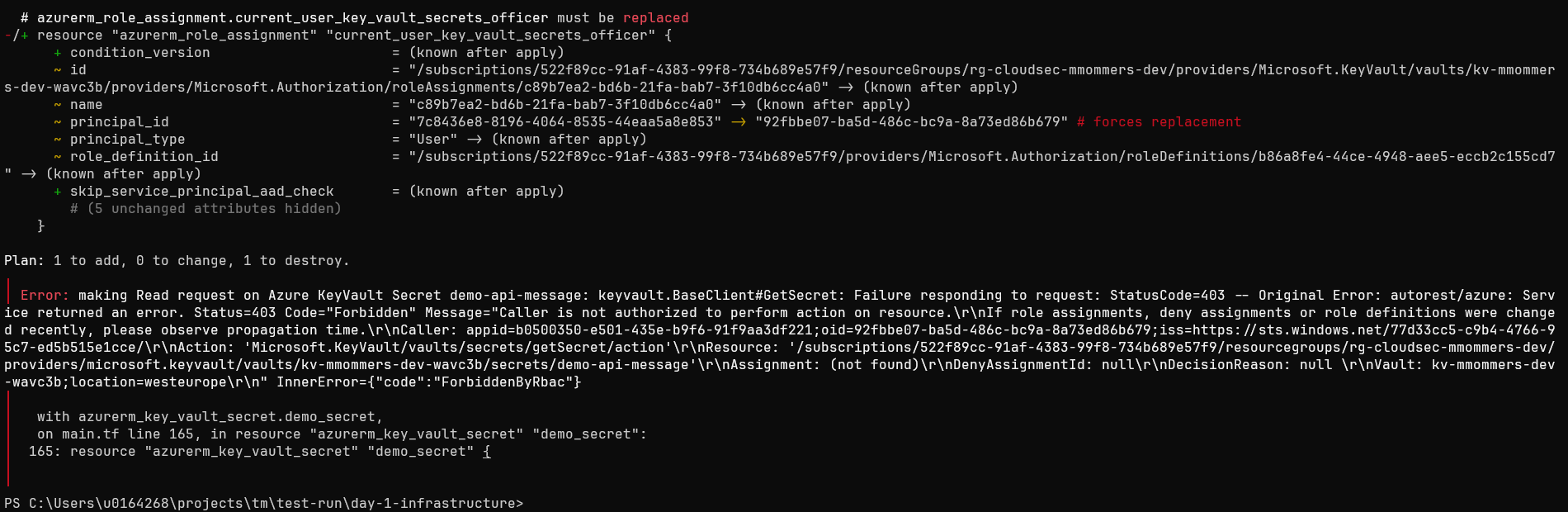
Terraform may plan or create some resources successfully.
It should fail when it reaches resources such as:
resource "azurerm_role_assignment" "..." {
  ...
}
You may see an error mentioning:
Microsoft.Authorization/roleAssignments/writeor:
AuthorizationFailedThe important lesson:
Contributor can create and manage many Azure resources.
Contributor cannot assign Azure RBAC roles.
It shows that Azure separates resource management from access management.
Part 4 - Investigate before fixing
Before choosing a fix, inspect what Terraform is trying to create.
Look for role assignment resources in the Terraform code:
grep -R "azurerm_role_assignment" .Or inspect the Terraform plan:
terraform planTry to answer:
Which identity is Terraform using?
Which role assignments is Terraform trying to create?
Which identity receives those roles?
At which scope are those roles assigned?
Does Terraform need access at the full resource group scope?
Could some permissions be scoped to individual resources?
What problem appears if those resources do not exist yet?
Do not rush straight to Owner.
The challenge is to make the deployment work while keeping the deployment identity as limited as practical.
The practical scope problem
In theory, you might want to give Terraform role-assignment permission only on the exact resources where it needs to create role assignments.
For example:
RBAC assignment permission on the backend App Service
RBAC assignment permission on the Key Vault
That sounds ideal, but there is a practical problem:
Those resources do not exist yet before Terraform runs.So you cannot manually assign the Terraform identity role-assignment permission on the future App Service or future Key Vault before Terraform has created them.
That creates a deployment design question:
How can Terraform create role assignments for resources that do not exist yet, without giving it broad Owner access?
The useful middle ground is:
Scope the delegation to the lab resource group,
because the future resources will be inside that resource group,
but constrain what the deployment identity is allowed to assign.
This is the central compromise in this challenge.
Fix options
There are several ways to fix the deployment. Each option has a different security trade-off.
Option A - Assign Owner to the identity
The simplest fix is to assign Owner to the Terraform deployment identity.
az role assignment create `
  --assignee <APP_ID> `
  --role Owner `
  --resource-group <RESOURCE_GROUP_NAME>
Run Terraform again:
terraform applyWhy this works
Owner can manage resources and assign access.
That means Terraform can:
create resources
update resources
delete resources
create role assignments
remove role assignments
Why this is risky
Owner is very powerful.
A compromised deployment identity with Owner can change resources and grant access to other identities.
It can modify the security model of the environment.
This option is acceptable as a quick lab fix when the scope is limited and the goal is to continue quickly.
It is not the best model for a production deployment identity.
Option B - Role separation with constrained delegation (kinda ABAC)
A better option is to separate responsibilities.
Terraform may need to do two different things:
deploy resources
assign access
Those should not automatically be treated as one permission set.
For this lab, a practical middle ground is:
| Responsibility | Possible role | Practical scope |
|---|---|---|
| Deploy lab resources | Contributor | Lab resource group |
| Assign required access | Role Based Access Control Administrator with conditions | Lab resource group |
The RBAC assignment permission is scoped to the lab resource group because the App Service and Key Vault do not exist yet when the deployment identity is prepared.
However, this does not mean Terraform should be allowed to assign any role.
The important improvement is to constrain what the deployment identity may assign.
For this lab, Terraform should only be allowed to assign the roles required by the lab, for example:
Contributor
Key Vault Secrets User
Depending on your Terraform setup, you may also need to allow:
Key Vault Secrets OfficerOnly include that if Terraform is responsible for creating the demo secret and managing secret-related setup.
Why this works
Terraform receives permission at a scope that already exists: the resource group.
The future App Service and future Key Vault will be created inside that scope.
So Terraform can create resources first and then create role assignments on those resources during the same deployment.
The model becomes:
Terraform deployment identity
+ Contributor at lab resource group scope
+ RBAC delegation at lab resource group scope
+ Conditions that limit which roles may be assigned
Why this is better than Owner
The deployment identity is still powerful, but less open-ended than Owner.
It can deploy resources in the lab resource group.
It can manage specific role assignments needed by the lab.
It should not be able to assign arbitrary privileged roles such as Owner if the condition is configured correctly.
The key idea:
Do not scope the RBAC permission to future resources.
Scope it to the parent resource group, then constrain the allowed assignments.
Suggested mental model
Info
The exact Azure command for assigning a role with conditions can be awkward and may vary depending on the portal or CLI workflow used. It is acceptable to do this through the Azure Portal, before commting this to a external CI/CD pipeline, script, ...:
Resource group
Access control (IAM)
Add role assignment
Role: Role Based Access Control Administrator
Members: Terraform deployment identity
Conditions: restrict which roles may be assigned
The main lesson is the design pattern:
parent scope + constrained delegationYou can find more info here on the conditions syntax: Conditions Format
Note
Ideally, you would also constrain which principal IDs can receive role assignments.
In this lab, that is difficult in a single Terraform run because the backend managed identity principal ID is only known after the App Service has been created.
A stricter approach would split the deployment into two phases:
- Deploy the resources and identities.
- Configure constrained role assignment permissions using the known principal IDs, then apply the role assignments.
This is more secure, but also more complex.
Option C - Custom roles with clear scopes and constrained delegation
The most precise option is to create custom roles.
Instead of using broad built-in roles, you define what the Terraform deployment identity is allowed to do.
You can create custom roles such as:
| Custom role | Purpose |
|---|---|
| Custom lab resource deployer | Allows Terraform to deploy the required lab resources |
| Custom RBAC assignment manager | Allows Terraform to create the required role assignments |
| Optional custom backend role | Allows the backend app to do only what the app actually needs |
The model becomes:
Terraform deployment identity
+ Custom lab resource deployment role
+ Custom or constrained RBAC assignment role
The important part is not only the permissions.
The important part is also the scope and the allowed role assignments.
Practical scope choice
Because the App Service and Key Vault do not exist yet before Terraform runs, the RBAC assignment manager cannot be pre-assigned directly to those resource scopes in a one-pass deployment.
So the practical starting point is:
Custom resource deployment role at resource group scope
Custom RBAC assignment manager at resource group scope
Restriction on which roles can be assigned
This allows Terraform to deploy the resources and create the required role assignments, while avoiding broad Owner.
Option C mental model
Custom RBAC assignment manager
A custom RBAC assignment manager role can allow Terraform to manage role assignments without giving full Owner.
Example role definition:
{
  "Name": "CloudSec Terraform RBAC Assignment Manager",
  "IsCustom": true,
  "Description": "Allows Terraform to manage Azure RBAC role assignments for the CloudSec lab.",
  "Actions": [
    "Microsoft.Authorization/roleAssignments/read",
    "Microsoft.Authorization/roleAssignments/write",
    "Microsoft.Authorization/roleAssignments/delete",
    "Microsoft.Authorization/roleDefinitions/read"
  ],
  "NotActions": [],
  "DataActions": [],
  "NotDataActions": [],
  "AssignableScopes": [
    "/subscriptions/<SUBSCRIPTION_ID>/resourceGroups/<RESOURCE_GROUP_NAME>"
  ]
}
Save the file as:
cloudsec-terraform-rbac-assignment-manager.jsonCreate the custom role:
az role definition create `
  --role-definition cloudsec-terraform-rbac-assignment-manager.json
Assign it to the Terraform deployment identity at the resource group scope:
az role assignment create `
  --assignee <APP_ID> `
  --role "CloudSec Terraform RBAC Assignment Manager" `
  --resource-group <RESOURCE_GROUP_NAME>
Run Terraform again:
terraform applyWarning
This custom role controls which RBAC actions are available, but by itself it does not restrict which role definitions Terraform can assign.
For stronger control, combine the role with constrained delegation or carefully control the Terraform code and review process.
Custom resource deployment role
You can also replace the broad Contributor role.
Create a second custom role for resource deployment.
This role should include only the resource provider actions needed by the lab.
The lab may need permissions for:
Resource Groups
App Service Plans
Linux Web Apps
Storage Accounts
Key Vaults
Log Analytics Workspaces
Application Insights
diagnostic settings
managed identity configuration
A simplified starting point:
{
  "Name": "CloudSec Terraform Lab Resource Deployer",
  "IsCustom": true,
  "Description": "Allows Terraform to deploy the Azure resources required for the CloudSec lab.",
  "Actions": [
    "Microsoft.Resources/subscriptions/resourceGroups/read",
    "Microsoft.Resources/subscriptions/resourceGroups/write",

    "Microsoft.Web/serverfarms/read",
    "Microsoft.Web/serverfarms/write",
    "Microsoft.Web/serverfarms/delete",

    "Microsoft.Web/sites/read",
    "Microsoft.Web/sites/write",
    "Microsoft.Web/sites/delete",
    "Microsoft.Web/sites/config/read",
    "Microsoft.Web/sites/config/write",

    "Microsoft.Storage/storageAccounts/read",
    "Microsoft.Storage/storageAccounts/write",
    "Microsoft.Storage/storageAccounts/delete",
    "Microsoft.Storage/storageAccounts/listKeys/action",

    "Microsoft.KeyVault/vaults/read",
    "Microsoft.KeyVault/vaults/write",
    "Microsoft.KeyVault/vaults/delete",

    "Microsoft.OperationalInsights/workspaces/read",
    "Microsoft.OperationalInsights/workspaces/write",
    "Microsoft.OperationalInsights/workspaces/delete",

    "Microsoft.Insights/components/read",
    "Microsoft.Insights/components/write",
    "Microsoft.Insights/components/delete",

    "Microsoft.Insights/diagnosticSettings/read",
    "Microsoft.Insights/diagnosticSettings/write",
    "Microsoft.Insights/diagnosticSettings/delete"
  ],
  "NotActions": [],
  "DataActions": [],
  "NotDataActions": [],
  "AssignableScopes": [
    "/subscriptions/<SUBSCRIPTION_ID>/resourceGroups/<RESOURCE_GROUP_NAME>"
  ]
}
Warning
This custom role is a starting point.
Terraform may require additional permissions depending on the exact resources, provider behavior, diagnostic settings, identity configuration, and future lab changes.
Optional advanced pattern - Two-phase deployment
There is another way to get very precise scopes: split the deployment into phases.
Phase 1: Terraform creates the base resources only.
Phase 2: An operator assigns RBAC management permission at the now-existing resource scopes.
Phase 3: Terraform creates the role assignments.
This makes very narrow resource-level RBAC delegation possible.
For example, after Phase 1, you could assign RBAC assignment permission directly on:
the created App Service
the created Key Vault
But this adds more process and makes the lab harder to run.
For this course, the recommended middle ground is:
Use the resource group as the delegation boundary,
then restrict what the deployment identity may assign.
Additional challenge - Custom role for the backend app
If you finish early, design a custom role for the backend managed identity.
Use minimal guidance.
The goal is to answer:
What is the smallest useful role the backend app needs?
Your task
Design a custom Azure role for the backend app.
Think about:
What should the app actually do?
Which Azure resource does it need to access?
Is the required access management-plane or data-plane?
Which actions are required?
Which actions should be excluded?
What is the narrowest useful scope?
How will you test the role?
Role design flow
Role skeleton
{
  "Name": "CloudSec Backend App Custom Role",
  "IsCustom": true,
  "Description": "Custom role for the backend application identity in the CloudSec lab.",
  "Actions": [],
  "NotActions": [],
  "DataActions": [],
  "NotDataActions": [],
  "AssignableScopes": [
    "/subscriptions/<SUBSCRIPTION_ID>/resourceGroups/<RESOURCE_GROUP_NAME>"
  ]
}
Warning
Do not assume every permission belongs in Actions.
Azure separates management-plane permissions from data-plane permissions.
Test your role
Test both positive and negative behavior.
| Test | Expected result |
|---|---|
| Backend performs required app function | Works |
| Backend modifies unrelated resource | Fails |
| Backend reads data it should not read | Fails |
| Backend manages access or role assignments | Fails |
The expected outcome is not one perfect role.
The expected outcome is a reasoned access design.
Compare the options
| Option | Works? | Simplicity | Security fit |
|---|---|---|---|
| Contributor only | No | Easy | Too limited for role assignments |
| Owner | Yes | Easy | Broad and risky |
| Contributor + constrained RBAC delegation | Yes | Medium | Practical middle ground |
| Custom resource role + constrained RBAC delegation | Maybe, after testing | Advanced | Closer to least privilege |
| Two-phase deployment | Yes | Advanced | Precise but more operational work |
Reflection questions
- Why did Terraform fail with only
Contributor? - What is the difference between deploying resources and assigning access?
- Why is a Terraform deployment identity more sensitive than an application identity?
- What is the risk of using
Owner? - Why is role separation clearer than assigning
Owner? - Why is resource-level RBAC delegation difficult before Terraform creates the resources?
- Why is the resource group a practical delegation boundary in this lab?
- What problem do conditions or constrained delegation help solve?
- What makes custom roles harder to maintain?
- Which option did you choose in the lab, and why?
- Which option would you prefer in a real environment?
Cleanup
Remove extra access when it is no longer needed.
az role assignment delete `
  --assignee <APP_ID> `
  --role "<ROLE_NAME>" `
  --resource-group <RESOURCE_GROUP_NAME>
If you assigned a role at another scope, delete it using the same scope:
az role assignment delete `
  --assignee <APP_ID> `
  --role "<ROLE_NAME>" `
  --scope <RESOURCE_ID>
Optionally remove the service principal:
az ad sp delete `
  --id <APP_ID>
If you created custom roles, remove them when the lab is finished:
az role definition delete `
  --name "CloudSec Terraform RBAC Assignment Manager"
az role definition delete `
--name "CloudSec Terraform Lab Resource Deployer"az role definition delete `
--name "CloudSec Backend App Custom Role"Final takeaway
Key takeaway
Terraform does not only need permission to create resources.
If Terraform also manages Azure RBAC role assignments, the deployment identity needs permission to manage access.
That makes the deployment identity privileged, so it must be scoped carefully.
A good deployment identity is:
specific to the deployment
limited to the required scope
powerful enough to deploy
not broader than necessary
removable after use
monitored when active
A poor deployment identity is:
shared by many systems
permanently overprivileged
assigned broad access without a reason
able to grant access everywhere
forgotten after deployment
The challenge is not simply:
How do we make Terraform work?The real challenge is:
How do we make Terraform work without giving it more power than it needs?