
Day 2 — Network and Data Security
Day 2 — Network and Data Security
Today we move from identity to exposure.
Identity controls who can act. Network controls what is reachable.
The core question for today is:
What is reachable, what should be reachable, and what should be private?
The central teaching message
A service is not private because we call it "backend".
If it has a public URL, it is public.
This sounds obvious, but it is one of the most common mistakes in cloud architectures.
Day 2 architecture
Today we work with a four-layer application:
The internal backend service is the central object of today.
It exists to serve the public API.
It should not be reachable from the public internet.
Day 2 Setup
You can checkout the new source files using the following links:
Day 2 Demo App
Day 2 Infrastructure
Caution
The script requires that it's relative to the 2 repo's.
It also requires Powershell >7 to work, you can install the latest version of powershell using the info here: MS Docs Powershell 7.6.
Easiest method if winget is available:
winget install --id Microsoft.PowerShell --source winget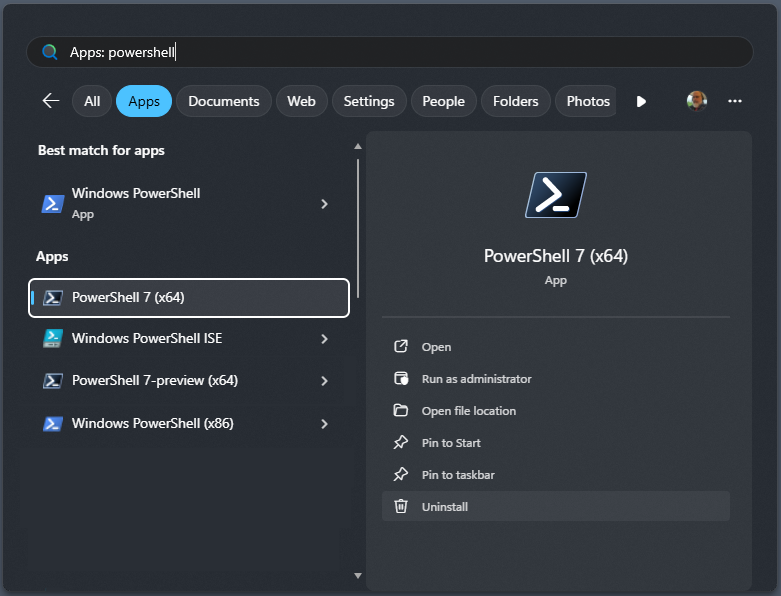
Make sure to start Powershell 7 and not regular powershell as they are co-existing.
Deployment Script
Place the deployment script in the parent folder of the Day 2 repositories. Save as e.g. deploy.ps1
#Requires -Version 7
<#
.SYNOPSIS
    Deploy Day 2 infrastructure and applications.

.DESCRIPTION
    1. Runs terraform init + apply in infrastructure/day-2
    2. Reads terraform outputs
    3. Builds and deploys the public backend API (App Service)
    4. Builds and deploys the internal backend service (App Service)
    5. Builds the frontend with the correct API URL and uploads to blob storage

.PARAMETER StudentPrefix
    Unique student prefix (3-12 lowercase letters/numbers). Passed as
    terraform var student_prefix. Must match what is in terraform.tfvars
    if that file already exists.

.PARAMETER Location
    Azure region. Default: westeurope

.PARAMETER Environment
    Environment name. Default: dev

.PARAMETER SkipInfra
    Skip terraform init/apply and read outputs from an already-deployed stack.

.PARAMETER SkipApps
    Run terraform only; skip all app builds and deployments.

.EXAMPLE
    .\scripts\deploy.ps1 -StudentPrefix jdoe

.EXAMPLE
    .\scripts\deploy.ps1 -StudentPrefix jdoe -SkipInfra

.NOTES
    Prerequisites
    - PowerShell 7+
    - Azure CLI (az)  logged in with `az login`
    - Terraform CLI
    - Node.js 20+
    - npm
#>

[CmdletBinding()]
param (
    [Parameter(Mandatory)]
    [ValidatePattern('^[a-z0-9]{3,12}$')]
    [string] $StudentPrefix,

    [string] $Location    = 'northeurope',
    [string] $Environment = 'dev',

    [switch] $SkipInfra,
    [switch] $SkipApps
)

Set-StrictMode -Version Latest
$ErrorActionPreference = 'Stop'


function Step([string]$msg) {
    Write-Host ''
    Write-Host "===> $msg" -ForegroundColor Cyan
}

function Info([string]$msg) {
    Write-Host "     $msg" -ForegroundColor Gray
}

function Bail([string]$msg) {
    Write-Host "ERROR: $msg" -ForegroundColor Red
    exit 1
}

function Require([string]$cmd) {
    if (-not (Get-Command $cmd -ErrorAction SilentlyContinue)) {
        Bail "'$cmd' is not installed or not on PATH."
    }
}

function Get-TerraformOutputValue([object]$outputsObj, [string]$name) {
    $propNames = @($outputsObj.PSObject.Properties.Name)
    if ($propNames -notcontains $name) {
        $available = ($propNames | Sort-Object) -join ', '
        Bail "Terraform output '$name' not found. Available outputs: $available. If you deployed previously, re-run without -SkipInfra so Terraform updates the stack and outputs."
    }

    return $outputsObj.$name.value
}


Require 'az'
Require 'terraform'
Require 'node'
Require 'npm'
Require 'zip'


$account = az account show 2>$null | ConvertFrom-Json
if (-not $account) {
    Bail "Not logged in to Azure CLI. Run: az login"
}
Info "Logged in as: $($account.user.name)  |  Subscription: $($account.name)"


$repoRoot    = $PSScriptRoot
$infraDir    = Join-Path $repoRoot 'day-2-infra'
$appsDir     = Join-Path $repoRoot 'course-cloud-security-demo-app/apps'
$backendDir  = Join-Path $appsDir  'backend'
$internalDir = Join-Path $appsDir  'backend-internal'
$frontendDir = Join-Path $appsDir  'frontend'
$tmpDir      = Join-Path ([System.IO.Path]::GetTempPath()) "cloudsec-deploy-$StudentPrefix"

Info "Repo root resolved to: $repoRoot"
Info "Infrastructure dir:    $infraDir"


if (-not (Test-Path $infraDir)) {
    Bail "Infrastructure directory not found: $infraDir. Ensure you run this script from the repo root or scripts/ directory."
}
if (-not (Test-Path $appsDir)) {
    Bail "Apps directory not found: $appsDir. Ensure the course-cloud-security-demo-app/ directory exists."
}


if (-not $SkipInfra) {
    $tfvarsPath = Join-Path $infraDir 'terraform.tfvars'

    # make sure tfvars file exists if not prompt to create it
    if (-not (Test-Path $tfvarsPath)) {

        # copy the example
        $examplePath = "$tfvarsPath.example"
        if (-not (Test-Path $examplePath)) {
            Bail "Example terraform.tfvars not found at $examplePath. Ensure you have the latest code and that the file exists."
        }
        Copy-Item $examplePath $tfvarsPath
        Write-Host "Created terraform.tfvars from example. Please review and update values as needed, then re-run the script." -ForegroundColor Yellow
        exit 0
    }

    Step 'Terraform: init'
    Push-Location $infraDir
    try {
        Info "Working directory: $(Get-Location)"
        Info "Terraform files:"
        Get-ChildItem -Filter '*.tf' | ForEach-Object { Info "  $($_.Name)" }

        terraform init -upgrade
        if ($LASTEXITCODE -ne 0) { Bail 'terraform init failed' }

        Step 'Terraform: apply'
        terraform apply `
            -auto-approve
        if ($LASTEXITCODE -ne 0) { Bail 'terraform apply failed' }
    }
    finally {
        Pop-Location
    }
}


Step 'Reading terraform outputs'
Push-Location $infraDir
try {
    $outputs = terraform output -json | ConvertFrom-Json
    if ($LASTEXITCODE -ne 0) { Bail 'terraform output failed' }
}
finally {
    Pop-Location
}

$resourceGroup         = $outputs.resource_group_name.value
$resourceGroup         = Get-TerraformOutputValue $outputs 'resource_group_name'
$publicBackendAppName  = Get-TerraformOutputValue $outputs 'public_backend_app_name'
$publicBackendUrl      = Get-TerraformOutputValue $outputs 'public_backend_url'
$internalAppName       = Get-TerraformOutputValue $outputs 'internal_backend_app_name'
$internalBackendUrl    = Get-TerraformOutputValue $outputs 'internal_backend_url'
$storageAccountName    = Get-TerraformOutputValue $outputs 'frontend_storage_account_name'
$dbStorageAccountName  = Get-TerraformOutputValue $outputs 'db_storage_account_name'
$frontendUrl           = Get-TerraformOutputValue $outputs 'frontend_url'

Info "Resource group        : $resourceGroup"
Info "Public backend app    : $publicBackendAppName"
Info "Public backend URL    : $publicBackendUrl"
Info "Internal backend app  : $internalAppName"
Info "Internal backend URL  : $internalBackendUrl"
Info "Frontend storage      : $storageAccountName"
Info "DB storage account    : $dbStorageAccountName"
Info "Frontend URL          : $frontendUrl"

if ($SkipApps) {
    Write-Host ''
    Write-Host 'SkipApps set  infrastructure done, exiting.' -ForegroundColor Yellow
    exit 0
}


if (Test-Path $tmpDir) { Remove-Item $tmpDir -Recurse -Force }
New-Item -ItemType Directory -Path $tmpDir | Out-Null


Step 'Public backend: npm install'
Push-Location $backendDir
try {
    npm install --prefer-offline
    if ($LASTEXITCODE -ne 0) { Bail 'npm install failed for backend' }

    Step 'Public backend: build (tsc)'
    npm run build
    if ($LASTEXITCODE -ne 0) { Bail 'npm run build failed for backend' }
}
finally {
    Pop-Location
}

Step 'Public backend: create zip'
$backendZip = Join-Path $tmpDir 'backend.zip'
Push-Location $backendDir
try {
    zip -r $backendZip src dist package.json package-lock.json tsconfig.json
    if ($LASTEXITCODE -ne 0) { Bail 'zip failed for backend' }
}
finally {
    Pop-Location
}

Step 'Public backend: deploy to App Service'
az webapp deploy `
    --resource-group $resourceGroup `
    --name          $publicBackendAppName `
    --src-path      $backendZip `
    --type          zip `
    --async         false
if ($LASTEXITCODE -ne 0) { Bail 'Deploy failed for public backend' }

Step 'Public backend: set startup command'
az webapp config set `
    --resource-group $resourceGroup `
    --name           $publicBackendAppName `
    --startup-file   'node dist/index.js'
if ($LASTEXITCODE -ne 0) { Bail 'Failed to set startup command for public backend' }


Step 'Internal backend: npm install'
Push-Location $internalDir
try {
    npm install --prefer-offline
    if ($LASTEXITCODE -ne 0) { Bail 'npm install failed for backend-internal' }

    Step 'Internal backend: build (tsc)'
    npm run build
    if ($LASTEXITCODE -ne 0) { Bail 'npm run build failed for backend-internal' }
}
finally {
    Pop-Location
}

Step 'Internal backend: create zip'
$internalZip = Join-Path $tmpDir 'backend-internal.zip'
Push-Location $internalDir
try {
    $zipItems = @('src', 'dist', 'package.json', 'tsconfig.json')
    if (Test-Path 'package-lock.json') { $zipItems += 'package-lock.json' }
    zip -r $internalZip $zipItems
    if ($LASTEXITCODE -ne 0) { Bail 'zip failed for backend-internal' }
}
finally {
    Pop-Location
}

Step 'Internal backend: deploy to App Service'
az webapp deploy `
    --resource-group $resourceGroup `
    --name          $internalAppName `
    --src-path      $internalZip `
    --type          zip `
    --async         false
if ($LASTEXITCODE -ne 0) { Bail 'Deploy failed for internal backend' }

Step 'Internal backend: set startup command'
az webapp config set `
    --resource-group $resourceGroup `
    --name           $internalAppName `
    --startup-file   'node dist/index.js'
if ($LASTEXITCODE -ne 0) { Bail 'Failed to set startup command for internal backend' }


Step 'Frontend: npm install'
Push-Location $frontendDir
try {
    npm install --prefer-offline
    if ($LASTEXITCODE -ne 0) { Bail 'npm install failed for frontend' }

    Step "Frontend: build  (VITE_API_BASE_URL=$publicBackendUrl)"
    $env:VITE_API_BASE_URL = $publicBackendUrl
    npm run build
    if ($LASTEXITCODE -ne 0) { Bail 'npm run build failed for frontend' }
}
finally {
    # Clean up env var regardless of success/failure
    Remove-Item Env:VITE_API_BASE_URL -ErrorAction SilentlyContinue
    Pop-Location
}

Step 'Frontend: upload to blob storage ($web container)'
az storage blob upload-batch `
    --account-name $storageAccountName `
    --destination  '$web' `
    --source       (Join-Path $frontendDir 'dist') `
    --overwrite
if ($LASTEXITCODE -ne 0) { Bail 'Frontend upload to blob storage failed' }


Step 'Smoke tests'

function Test-Endpoint([string]$label, [string]$url) {
    Info "GET $url"
    $response = az rest --method get --url $url --output json 2>$null
    if ($LASTEXITCODE -eq 0) {
        Write-Host "     [OK]  $label" -ForegroundColor Green
    } else {
        Write-Host "     [FAIL] $label  app may still be starting up" -ForegroundColor Yellow
    }
}


Start-Sleep -Seconds 10

Test-Endpoint 'Public backend /api/health'   "$publicBackendUrl/api/health"
Test-Endpoint 'Public backend /api/security/secret-demo'   "$publicBackendUrl/api/security/secret-demo"
Test-Endpoint 'Internal backend /internal/health' "$internalBackendUrl/internal/health"


Write-Host ''
Write-Host '====================================================' -ForegroundColor Green
Write-Host ' Deployment complete' -ForegroundColor Green
Write-Host '====================================================' -ForegroundColor Green
Write-Host ''
Write-Host "  Frontend          : $frontendUrl"
Write-Host "  Public backend    : $publicBackendUrl"
Write-Host "  Internal backend  : $internalBackendUrl"
Write-Host "  DB storage account: $dbStorageAccountName"
Write-Host ''
Write-Host 'Temp artifacts written to:' -ForegroundColor Gray
Write-Host "  $tmpDir" -ForegroundColor Gray
Write-Host ''
Azure Storage Explorer
You will also need Azure Storage Explorer as a DBMS for Azure Storage Tables. You can download and install it from: Download Link
Day 2 storyline
Today we follow one security improvement cycle.
The goal is not only to find an exposed service.
The goal is to understand why it is exposed, demonstrate the risk, reduce the exposure, and prove the fix worked.
What we start with
At the beginning of Day 2, the environment has these intentional misconfigurations:
| Component | State | Problem? |
|---|---|---|
| Frontend | Public | Expected |
| Public Backend API | Public | Expected |
| Internal Backend Service | Public | Problem |
| DB Storage Account | Public network access enabled | Problem |
| Key Vault | Public network access enabled | Problem |
What we work toward
By the end of Day 2, the environment should look like this:
| Component | State | |
|---|---|---|
| Frontend | Public | Unchanged |
| Public Backend API | Public (HTTPS enforced) | Hardened |
| Internal Backend Service | Reachable only by Public Backend API | Fixed |
| DB Storage Account | Reachable only through private path | Fixed |
| Key Vault | Reachable only through private path | Fixed |
Day 2 labs
| Lab | Focus |
|---|---|
| Lab 2.1 | Map public and internal exposure |
| Lab 2.2 | Demonstrate internal backend exposure |
| Lab 2.3 | Segment the internal backend |
| Lab 2.4 | Protect the data layer (Table Storage) |
| Lab 2.5 | Protect the data layer (Key Vault) |
| Lab 2.6 | NSG rules |
| Optional 2.x | Bastion management path |
Teaching rhythm
The same rhythm as Day 1 applies:
short theory
→ lab
→ recap
→ next short theory
→ lab
→ recap
Each theory block gives just enough context to start the next lab.