
Data Protection — Encryption and Storage Security
Data Protection — Encryption and Storage Security
Network controls determine what is reachable. Data protection determines what is readable.
Even if an attacker bypasses your network controls and reaches your storage layer, encrypted data is not immediately useful without the key.
This page covers the two encryption dimensions — at rest and in transit — and how Azure Storage Accounts fit into the data protection picture alongside Cosmos DB and Key Vault.
Two dimensions of encryption
| Dimension | What it protects | Where it applies |
|---|---|---|
| Encryption at rest | Data written to disk or storage media | Cosmos DB, Storage Account, Key Vault, SQL, disks |
| Encryption in transit | Data moving across a network | HTTPS on App Service, TLS to Cosmos DB/Key Vault/Storage |
Both are required. They protect against different threats:
Encryption at rest   → protects against physical media theft, storage-layer access
Encryption in transit → protects against network interception (man-in-the-middle)
Encryption at rest in Azure
Azure encrypts data at rest by default for all storage services using platform-managed keys (PMK) — keys that Azure generates, stores, and rotates automatically.
You do not need to configure anything to get encryption at rest. It is always on.
Customer-managed keys (CMK)
If your compliance requirements demand control over the encryption key — for example, the ability to revoke access instantly or prove the key never left your custody — you can use customer-managed keys (CMK).
With CMK:
- You generate and store the key in Azure Key Vault
- Azure storage services use that key instead of a platform-managed one
- If you delete or disable the key in Key Vault, the data becomes inaccessible
| Platform-managed key | Customer-managed key | |
|---|---|---|
| Setup required | None | Key Vault + key + role assignment |
| Key rotation | Automatic | Manual or Key Vault policy |
| Key revocation | Not possible | Disable or delete key in Key Vault |
| Compliance use case | Standard | Regulated industries (banking, healthcare, government) |
CMK is not a Day 2 lab exercise
CMK configuration requires a Key Vault with soft-delete and purge protection enabled, and a role assignment between the storage service and Key Vault. This is covered conceptually here. The hands-on work in Lab 2.5 focuses on network protection of Key Vault, which is a prerequisite for CMK to be safe.
Encryption in transit
Azure PaaS services enforce TLS by default. You do not send plaintext to Cosmos DB, Key Vault, or Storage over the internet.
App Service — enforcing HTTPS
App Service allows both HTTP and HTTPS by default. HTTP requests are not automatically redirected unless you enable it.
To enforce HTTPS:
- Go to the App Service → Settings → Configuration → General settings
- Set HTTPS Only to On
Once enabled, HTTP requests receive a 301 Redirect to HTTPS. The application does not need to change.
HTTP is enabled by default
A newly created App Service accepts both HTTP and HTTPS. An attacker on the same network as the user could intercept an HTTP request before the redirect occurs. Enable HTTPS Only immediately after creating an App Service.
Minimum TLS version
App Service also lets you configure the minimum accepted TLS version:
- TLS 1.0 / 1.1 — deprecated, known vulnerabilities
- TLS 1.2 — current minimum standard
- TLS 1.3 — preferred for new workloads
Set this under: App Service → Settings → Configuration → General settings → Minimum inbound TLS version
Azure Storage Accounts
A Storage Account is the most general-purpose storage service in Azure. It stores blobs (files), queues, tables, and file shares.
In a typical Day 2 architecture, the frontend static website is hosted in a Storage Account blob container with the static website feature enabled.
Storage Account security model
| Control | Where to configure | What it does |
|---|---|---|
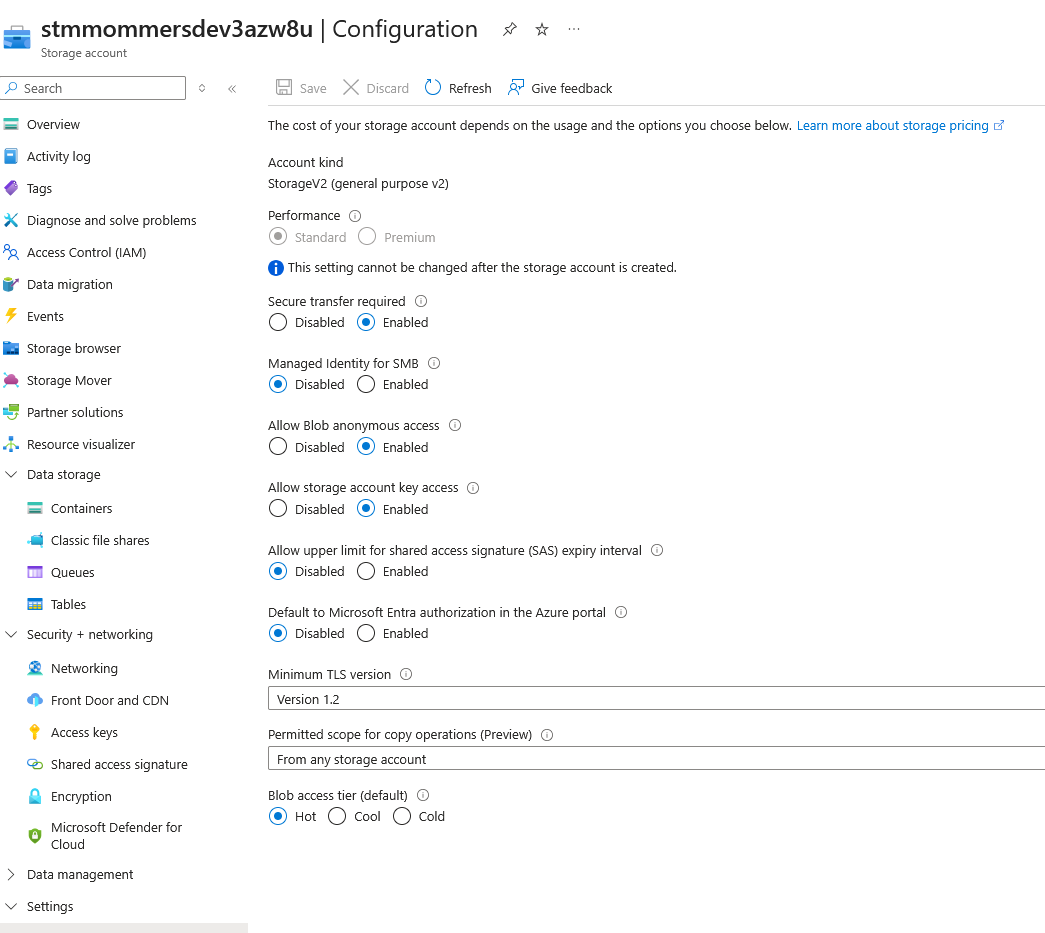
| Public access (blob) | Storage Account → Settings → Configuration | Allows unauthenticated reads of blobs |
| Network access | Storage Account → Security + networking → Networking | Restricts which networks can reach the account |
| Private endpoint | Storage Account → Security + networking → Networking | Routes traffic through the VNet |
| HTTPS only | Storage Account → Settings → Configuration | Rejects HTTP connections |
| Minimum TLS version | Storage Account → Settings → Configuration | Sets floor for TLS version |
| Shared Key access | Storage Account → Settings → Configuration | Enables/disables access via storage account keys |
Public blob access
By default, Storage Accounts allow configuration of anonymous read access per container. This is intentional for static website hosting — the HTML, CSS, and JS files should be publicly readable.
The risk: a misconfigured container with Blob or Container level public access exposes everything in it, including any accidentally uploaded secrets or data files.
Best practice:
- Allow public access only on containers that serve static assets
- All other containers should use Private access (require authentication)
Shared Key vs. managed identity
Storage Accounts have two primary authentication mechanisms:
| Method | How it works | Risk |
|---|---|---|
| Shared Key (storage account key) | A 512-bit key that grants full access to the account | If leaked, full account access — no expiry, no scope |
| SAS token | A signed URL with scoped permissions and an expiry time | Scoped and time-limited, but still a credential that can be leaked |
| Managed identity + RBAC | Azure AD token via the service's managed identity | No credential to leak; access controlled by role assignment |
Treat the storage account key like a root password: rotate it regularly, store it in Key Vault, and disable it in favour of managed identity + RBAC wherever the consumer supports it.
To disable Shared Key access: Storage Account → Settings → Configuration → Allow storage account key access → Disabled
How the controls layer together
| Scenario | Control that stops it |
|---|---|
| Attacker reads media from a decommissioned disk | Encryption at rest (always on, AES-256) |
| Attacker intercepts traffic between app and Cosmos DB | TLS in transit (always on for PaaS endpoints) |
| Attacker calls Cosmos DB over HTTP | TLS enforcement (Cosmos DB requires HTTPS; no HTTP option) |
| Attacker reaches Storage Account from public internet | Private endpoint + disabled public network access |
| Attacker reads a blob using an exposed SAS token | Expiry and scope limit damage; disable Shared Key access; prefer managed identity |
| Compliance audit requires proof of key custody | Customer-managed key in Key Vault with audit logs |
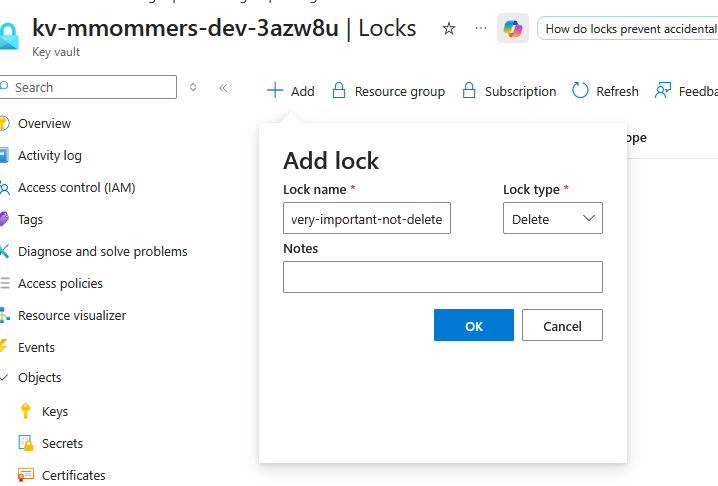
| Administrator accidentally deletes Key Vault | Delete lock on the resource |
| Team doesn't know a storage account contains PII | Purview scan + classification |
Resource locks
Encryption and network controls protect data while it exists. A resource lock protects against the resource being deleted or modified in the first place.
Azure has two lock types:
| Lock type | What it prevents |
|---|---|
| Delete | The resource cannot be deleted. It can still be modified. |
| ReadOnly | The resource cannot be deleted or modified. Read operations still work. |
Locks are applied at the resource, resource group, or subscription level. A lock on a resource group covers all resources inside it.
When to use locks
Apply a Delete lock to any resource that would be difficult or destructive to accidentally remove:
- Key Vault (deleting it breaks all secrets, keys, and CMK references)
- Storage Account hosting the frontend static website
- Cosmos DB account
- VNet and subnets (removing the VNet breaks private endpoint DNS resolution)
Apply a ReadOnly lock with caution — it blocks all modifications, including routine operations like rotating keys or changing access policies, and is rarely appropriate for active workloads.
How to apply a lock in the Portal
- Open the resource → Settings → Locks
- Select + Add
- Choose lock type: Delete or Read-only
- Give it a name (e.g.
lock-delete-keyvault) - Save
Locks do not replace RBAC
A lock prevents even owners and contributors from deleting a resource — but only as long as the lock itself is not removed first.
Anyone with the Owner role or the Microsoft.Authorization/locks/delete permission can remove the lock and then delete the resource. Locks are a safeguard against accidents, not against a determined privileged user.
Microsoft Purview — data governance and classification
Encryption protects data at rest. Private endpoints protect the path to it. Locks protect the resource from deletion. None of those tell you what the data actually is, where it lives, or whether it is being handled correctly.
That is the problem Microsoft Purview addresses.
Purview is a unified data governance platform. It scans your Azure resources, classifies the data it finds, and gives you a map of where sensitive data lives across your environment.
What Purview does
| Capability | What it gives you |
|---|---|
| Data Map | An inventory of data sources across Azure (and on-premises) — storage accounts, SQL databases, Cosmos DB, etc. |
| Data Catalog | A searchable catalogue of data assets with classification labels, owners, and lineage |
| Automated classification | Scans data and applies built-in sensitivity labels (e.g. credit card numbers, passport numbers, health data) |
| Data lineage | Tracks where data originated and how it moves through pipelines |
| Sensitivity labels | Integrates with Microsoft Information Protection labels — the same labels used in Microsoft 365 |
Why this matters for security
You cannot protect data you do not know you have. Purview answers:
- Which storage accounts contain personal data?
- Which Cosmos DB collections have fields that look like payment card numbers?
- Who owns this dataset, and when was it last reviewed?
Without this visibility, teams often apply the same controls to everything — which either over-restricts low-risk data or under-protects high-risk data.
How Purview scans Azure resources
Purview connects to Azure data sources using a managed identity with read access to the target resource. It runs a scan (on demand or on a schedule) and populates the Data Map with what it finds.
Scans do not copy your data out of your environment. Purview reads metadata and samples content to apply classifications.
Sensitivity labels and access control
Once data is classified, Purview labels can feed back into access control decisions:
- A storage container labelled Confidential can trigger an Azure Policy that requires a private endpoint
- A file in SharePoint labelled Highly Confidential can be blocked from external sharing automatically
- Labels can be applied automatically by Purview, or manually by data owners in the Catalog
Purview in the context of Day 2
The controls covered in Day 2 — private endpoints, HTTPS enforcement, TLS minimums, shared key access — are all applied uniformly. Purview adds a data-aware layer on top:
| Question | Who answers it |
|---|---|
| Can the attacker reach the storage account? | Private endpoint / NSG |
| Can the attacker read the data if they do reach it? | Encryption + managed identity |
| Does anyone know this storage account contains PII? | Purview |
| Is this dataset subject to GDPR or PCI-DSS? | Purview classification + policy |
Not a lab exercise
Purview requires a separate account provisioning step and a scan takes several minutes to complete. It is not included as a hands-on lab here. The concepts apply directly when you onboard a production environment.
Key takeaway
Summary
Azure encrypts all data at rest by default. You do not need to configure this.
What you do need to configure:
- HTTPS Only on App Services
- Minimum TLS 1.2 on App Services and Storage Accounts
- No public blob access on containers that are not serving static assets
- Managed identity instead of storage account keys where possible
- Private endpoints on storage services that should not be internet-reachable
Customer-managed keys are a compliance control, not a general security improvement. Implement them when required by regulation, after the network and identity controls are in place.
Purview sits above all of this — it tells you what data you have and where it is sensitive, so you can apply the right controls to the right resources.