
Theory — Service Endpoints vs Private Endpoints
Theory — Service Endpoints vs Private Endpoints
Lab 2.3 restricted which services can reach the internal backend. Lab 2.4 does the same for the data layer — but there are two mechanisms for that in Azure, and it is worth knowing the difference before you start: Service Endpoints and Private Endpoints.
The problem both solve
By default, Azure PaaS services (Cosmos DB, Storage, Key Vault, etc.) have a public endpoint reachable from the internet.
https://<account>.documents.azure.com      ← Cosmos DB
https://<account>.blob.core.windows.net    ← Storage Account
Even with authentication, this means:
- the attack surface includes the entire internet
- a leaked credential can be used from anywhere
- there is no network-level boundary
Both Service Endpoints and Private Endpoints reduce this surface. They do it differently.
Service Endpoints
A Service Endpoint extends your VNet's identity to an Azure service.
When you enable a Service Endpoint on a subnet, traffic from that subnet to the target service travels over the Azure backbone network rather than the public internet.
The service still has a public IP address — but you configure a firewall rule on the service to only accept connections from that specific subnet.
Everything else is denied.
How to enable (Azure Portal — Storage example)
- Navigate to your Virtual Network → Subnets → select the subnet.
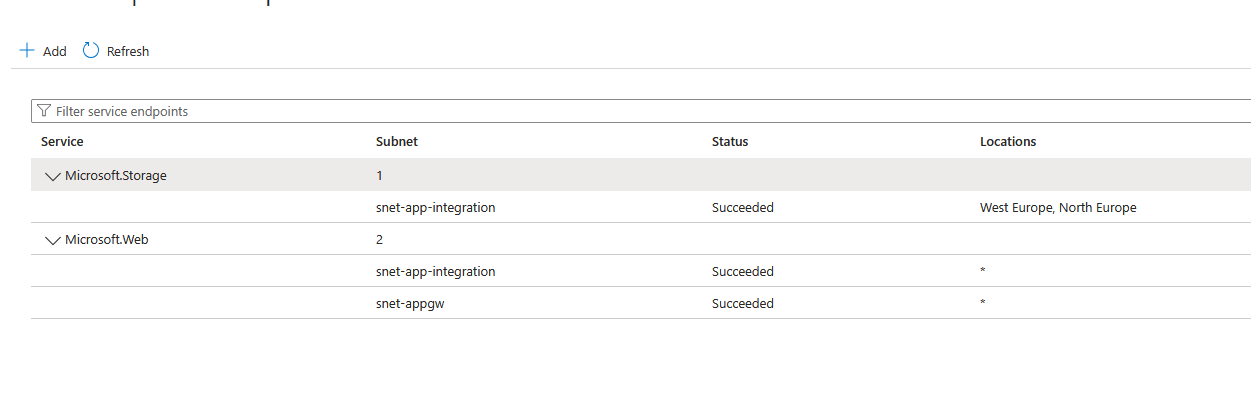
- Under Service endpoints, add
Microsoft.Storageand/orMicrosoft.AzureCosmosDB. - Save the subnet.
- Navigate to the Storage account → Security + networking → Networking.
- Under Firewalls and virtual networks, set Allow access from to Selected networks.
- Under Virtual networks, add the subnet you just updated.
- Save.
Private Endpoints
A Private Endpoint creates a network interface with a private IP inside your VNet that maps directly to a specific Azure resource instance.
Traffic never touches the public internet — it stays entirely within the VNet.
The public endpoint can be completely disabled.
DNS must be updated so the service hostname resolves to the private IP instead of the public one. Azure handles this through a Private DNS Zone — a zone linked to the VNet that overrides the public hostname with the private IP.
"Integrate with private DNS zone" in the Portal
When creating a private endpoint in the Azure Portal, the wizard shows a checkbox labelled Integrate with private DNS zone. Leave it checked. Azure will create the zone, add the A record, and link the zone to the VNet automatically.
If you skip this step, applications will still resolve the hostname to the public IP and the private endpoint will not be used — even though it exists.
Side-by-side comparison
| Service Endpoint | Private Endpoint | |
|---|---|---|
| Traffic path | Azure backbone (not public internet) | Entirely within VNet |
| Service keeps public IP | Yes | Yes (but can be disabled) |
| Service gets private IP in VNet | No | Yes |
| DNS change required | No | Yes (Private DNS Zone) |
| Can disable public endpoint entirely | No | Yes |
| Works across VNet peering / different regions | Limited | Yes |
| Cost | Free | ~€7–10/month per endpoint |
| Setup complexity | Low | Medium |
| Typical use case | Simple VNet-scoped access control | Full private isolation, regulated environments |
Which to use for Cosmos DB
Service Endpoints are supported for Cosmos DB (Microsoft.AzureCosmosDB), but they have a limitation: the public endpoint remains open — you are only filtering it by subnet.
For Cosmos DB in a production environment, Private Endpoints are strongly preferred because:
- the public endpoint can be disabled entirely
- the service is only reachable from within the VNet
- a leaked credential cannot be used from outside the VNet
Lab 2.4 uses Private Endpoints
Lab 2.4 uses a Private Endpoint for Cosmos DB — the stronger option.
Service Endpoints are shown here because you will encounter them in existing Azure environments, and understanding why Private Endpoints were chosen helps you evaluate the alternatives.
Which to use for Storage Accounts
Storage Accounts support both mechanisms.
Service Endpoints are commonly used for Storage when:
- the storage is accessed only from specific subnets within the same region
- private DNS management overhead is undesirable
- cost is a constraint (blob storage can have many accounts)
Private Endpoints are preferred when:
- the storage contains sensitive or regulated data
- you need to disable public blob access entirely
- the storage must be reachable from peered VNets or on-premises
Azure Private Link, Private Endpoint — what is the difference?
Azure documentation uses these three terms, often interchangeably. They are not the same thing.
| Term | What it is |
|---|---|
| Azure Private Link | The underlying Azure platform service that enables private connectivity. It is the technology, not something you deploy directly. |
| Private Endpoint | A network interface (NIC) with a private IP in your VNet, created using Private Link, pointing to a specific resource instance. This is what you deploy. |
| Private Link Service | A way to expose your own service (e.g. an internal API) via Private Link so other VNets or tenants can connect to it privately — without VNet peering. |
When you create a Private Endpoint for Cosmos DB, you are using Azure Private Link under the hood.
In practice
When someone says "set up Private Link for Cosmos DB" they almost always mean "create a Private Endpoint for Cosmos DB".
Private Link Service is only relevant when you are the provider of a service — for example, if you want to expose an internal API to another team's VNet without peering the two VNets together.
Summary
Service Endpoint     →  traffic via Azure backbone, public IP remains, free
Private Endpoint     →  traffic entirely private, public IP can be disabled, has cost
Private Link         →  the platform that makes Private Endpoints possible (not deployed directly)
Private Link Service →  expose your own service privately to other VNets (advanced)
Both are better than leaving a PaaS service fully public. The choice depends on data sensitivity, network topology, and cost.